Active Directory Certificate Services in Modern IT
Active Directory Certificate Services has long served certificate needs, but modern IT demands highlight its limitations in cloud environments, automation, scalability, and post-quantum readiness. This guide explores the merits of AD CS, its practical limitations, the mitigations Microsoft offers, and — critically — the ADCS replacement options available when those mitigations fall short.
What Active Directory Certificate Services Does
Evaluating the merits and limitations of relying on Active Directory Certificate Services (AD CS) for all certificate management needs in modern IT highlights that AD CS was fundamentally designed for on-premises deployment. Since its introduction in Windows 2000, it has successfully served private and public organisations as a critical solution for certificate issuance. However, the demands of modern IT present practical reasons to explore alternatives that are better suited to the contemporary landscape, which is increasingly decentralised, cloud-based, API-focused, and broadly adopting containerisation and related workloads.
Active Directory Certificate Services functions as a Microsoft Certificate Authority, issuing digital certificates and managing certificate templates within the Active Directory environment. The certificate templates folder and certificate template settings enable administrators to control how certificates are issued, whilst Active Directory integration provides automated certificate enrollment for domain-joined devices and users.
Why ADCS Replacement Matters
Modern organisations face challenges that AD CS struggles to address effectively. These limitations create security risks, operational inefficiencies, and barriers to digital transformation:
Modern Deployment and Cloud Environments
AD CS struggles with containerisation, automation, and cloud-native applications due to its stateful nature and tight integration with Active Directory. Hybrid deployments that span both on-premises and cloud environments are inherently complex and require additional tools and configurations. As workloads move to the cloud, the relevance of AD CS diminishes due to its deep integration with Active Directory.
Security and Multi-Tenancy
Ensuring AD CS maintains its security posture in containerised environments requires careful planning. Its single-tenant architecture makes it unwieldy and costly at scale, leading to CA proliferation and complex management. Misconfigurations by administrators can introduce vulnerabilities, including excessive permissions, certificate template settings errors, and inadequate access controls that security teams must continuously monitor.
Post-Quantum Compatibility
Current versions of AD CS lack support for post-quantum cryptography (though Microsoft has indicated it is coming). As quantum computing advances, traditional cryptographic algorithms like RSA and ECC are becoming vulnerable to quantum attacks. Microsoft AD CS has not yet integrated PQC algorithms, posing a significant risk for future-proofing security and data protection. The NIST PQC roadmap sets deprecation of these algorithms by 2030.
Operational and Evolutionary Challenges
Managing AD CS is resource-intensive, and it hasn’t significantly evolved since 2012. It lacks support for IoT devices and connected vehicles. Misconfigurations introduce vulnerabilities that can disrupt business operations and create security risks across the Public Key Infrastructure environment.
High Availability and Scalability
AD CS does not support active-active clustering and struggles to scale for millions of certificates issued. Its lack of multi-cloud and multi-OS support limits adaptability across different environments. Managing database files and ensuring high availability requires additional infrastructure and planning.
Certificate Management Limitations
The built-in AD CS tools are limited, lacking sufficient capabilities for tracking and reporting expired certificates. They do not support automation, such as integrating the deployment and installation of certificates to applications and hosts. Without centralised certificate lifecycle management capabilities, organisations struggle to maintain full visibility across their certificate estate, leading to certificate expiration incidents and service disruptions.
API and Automation Limitations
AD CS lacks comprehensive API support and integration with widely supported protocols like ACME, EST, and CMP, limiting automation opportunities. This makes integration with DevOps tools and modern workflows difficult, creating manual processes prone to human error.
Dependency on RPC
AD CS’s reliance on RPC/DCOM for certificate requests necessitates multiple ports, complicating firewall management and cloud integration. This architectural point creates challenges when organisations need to secure network access and control access across distributed environments.
Newer Use Cases
AD CS does not support emerging use cases like SSH certificates and Vehicle-to-Everything (V2X). As organisations adopt IoT devices and modern authentication methods, the limitations of Microsoft ADCS become more apparent.
Mitigations and Merits of Active Directory Certificate Services
Let’s review if mitigations exist for that comprehensive list.
Hybrid Deployment Support
Microsoft has enhanced AD CS’s hybrid capabilities to address its limitations. A hybrid deployment integrates on-premises AD CS with cloud-based services like Microsoft Entra, leveraging both environments. Certificates for cloud services are issued by a combination of on-premises AD CS and cloud-based services. The “Hybrid Certificate Trust” model ensures certificates issued by AD CS are trusted across both environments, enabling seamless authentication and secure communication. Azure Key Vault provides Certificate Authority services, creating and managing certificates issued by public CAs or self-signed certificates. Microsoft Cloud PKI and Microsoft Azure services provide additional options for organisations within the Microsoft ecosystem.
Security Enhancements
Microsoft is continually improving AD CS security features. Windows Server 2025 updates include new Kerberos features to minimise NTLM use, enhancing AD environments’ overall security. Security teams benefit from improved monitoring capabilities and reduced attack surface when properly configured.
Modernisation
Although AD CS isn’t natively designed for containerisation or microservices, Microsoft provides guidance and tools for modernisation. This includes leveraging Azure for hybrid deployments and using automation tools to streamline AD CS management. Organisations can install modern alternatives alongside existing AD CS infrastructure to support digital transformation whilst maintaining backwards compatibility with Windows servers and the Microsoft ecosystem.
Post-Quantum Readiness
Microsoft is preparing for quantum computing by integrating PQC algorithms into AD CS. Updates to SymCrypt and CNG support PQC algorithms, enabling AD CS to issue certificates with quantum-resistant cryptography. Transitioning to TLS 1.3 is emphasised for using quantum-safe key exchange and authentication methods. For a broader view of what the PQC transition involves beyond AD CS, see our guide on why PQC is a business transformation, not an algorithm swap.
Active Directory Auto Enrollment
On the merit side, although the deep integration with Active Directory can limit support for newer technologies like containerisation, it also enables automated certificate enrollment for Active Directory-enabled objects, such as workstations and servers, by leveraging Active Directory group policy. This auto enrollment capability reduces manual effort for provisioning certificates to domain-joined devices.
Web Enrollment Services
Similarly, although AD CS does not natively support REST APIs, third-party solutions and projects provide REST API interfaces for AD CS, enabling systems outside an Active Directory domain to request certificates via REST API calls. Additionally, the Certification Authority Web Enrollment service offers web pages that enable users to perform certificate tasks, such as requesting and renewing certificates.
Exploring Modern Alternatives: 10 Important Considerations
If these mitigations and merits aren’t deemed sufficient due to the fundamental lack of support for modern deployment methods like containerisation and integration with orchestration and automation technologies, here are 10 important considerations to be kept in mind:
1. Certificate Lifecycle Management — Seek features such as automated discovery, renewal, and deployment of certificates to reduce manual effort and minimise human error. Ensure integration with popular orchestration tools, which will be facilitated by broad API support. The CLM solution should have the capability to integrate seamlessly with any existing AD CS infrastructure, providing complete visibility into certificate expiration and expired certificates across the environment.
2. Comprehensive Visibility — Ensure the solution provides robust discovery tools to locate all certificates across various platforms, including servers, load balancers, firewalls, containers, and multi-cloud environments. Full visibility prevents certificate expiration incidents and enables security teams to maintain control over the entire certificate estate. A cryptographic bill of materials can provide this visibility at the broadest level, cataloguing not just certificates but all cryptographic assets across the organisation.
3. SaaS-Based Certificate Management Solution — Assess whether vendors offer a fully-featured SaaS solution that meets your organisation’s security requirements and use cases, helping to offload operational burden whilst providing scalability and flexibility. Note of caution: while Cloud PKIs can simplify processes, they may also hide underlying complexities and depend on custom scripts. Consider migration challenges, business continuity risks if the provider ceases operations, and potential conflicts with your requirements.
4. Post-Quantum Cryptography Support — Provides support for post-quantum cryptography to future-proof your Public Key Infrastructure against quantum computing threats.
5. Hardware Security Modules (HSM) Support — Seamless integration with common industry Hardware Security Modules solutions to protect private keys and CA certificates with robust data protection.
6. Integration with Existing Infrastructure — The solution should integrate with your existing systems, including Active Directory, cloud services, and orchestration tools like Kubernetes. Consider solutions that support AWS Private CA, Microsoft Azure, and other cloud environments whilst maintaining compatibility with on-premises Windows servers.
7. Scalability — Choose a solution that can scale with your organisation’s growth, managing an increasing number of certificates and supporting multi-cloud and multi-OS environments. Assess whether the solution supports multi-tenant configurations and the distribution of core Public Key Infrastructure components, such as Registration Authorities (RA) and Certification Authorities (CA).
8. Security and Compliance — The solution should provide comprehensive security features, including policy governance, compliance monitoring, and the capability to manage root of trust certificates. Ensure alignment with regulatory standards and the ability to control access and address security risks across different environments.
9. User Interface and Experience — A user-friendly interface and intuitive user experience are essential for efficient certificate management and ease of use. Security teams and administrators require centralised management capabilities that make sense for their operational workflows.
10. Assurance and Governance — Audited against stringent standards such as PCI DSS and holding recognised certifications like Common Criteria. These assurances provide confidence that the solution meets enterprise requirements and regulatory standards.
ADCS Replacement Options: What Are Your Alternatives?
The considerations above help evaluate what to look for. This section addresses the question directly: if AD CS no longer meets your needs, what are the practical replacement paths available?
Based on our experience delivering ADCS migrations across government and enterprise environments, three models cover the majority of scenarios. The right choice depends on how deeply AD CS is embedded in your environment, what your target architecture looks like, and how quickly you need to move.
Option 1: Supplement ADCS with Certificate Lifecycle Management
For organisations with heavy Active Directory integration and a large estate of domain-joined devices relying on auto-enrollment, a full ADCS replacement may not be necessary or practical in the short term. Instead, the most impactful step is to layer a certificate lifecycle management platform on top of the existing AD CS infrastructure.
Platforms such as Keyfactor Command and Certdog integrate directly with AD CS, providing the automated discovery, monitoring, renewal orchestration, and centralised visibility that AD CS lacks natively. This approach preserves your existing Certificate Authority investment and auto-enrollment workflows whilst closing the critical gaps in visibility and automation.
This model works well when AD CS is functioning reliably as a CA but the organisation has outgrown the native management tooling. It is also a practical first step before a more comprehensive migration, because the CLM platform provides the complete certificate inventory needed to plan subsequent changes.
Option 2: Migrate to EJBCA Enterprise
For organisations that need a full replacement of AD CS Certificate Authority capabilities — whether due to scalability limitations, protocol requirements, multi-platform support, or post-quantum readiness — EJBCA Enterprise provides a modern, open-standards CA platform that addresses every limitation discussed in this article.
EJBCA supports ACME, EST, CMP, and SCEP protocols natively, runs on-premises or in cloud environments, supports multi-tenancy and high availability, and is already integrating post-quantum algorithms. It provides a fundamentally different architecture from AD CS — one designed for modern deployment patterns rather than retrofitted onto a legacy Active Directory foundation.
Unsung has delivered complex ADCS-to-EJBCA migrations at scale. In our Entrust-to-EJBCA migration programme for a central government department, we migrated 20 Root Certificate Authorities from an end-of-life platform to EJBCA with zero operational disruption — developing a repeatable engineering methodology for a migration path the original vendor had declared impossible. This is the kind of migration complexity that ADCS replacement programmes typically involve, and it demonstrates that even the most challenging CA transitions can be executed safely with the right expertise and methodology.
Option 3: Hybrid Approach with CLM Layer
Many organisations operate a mixed certificate estate: internal certificates issued by a private CA for domain authentication, device management, and internal services, alongside public certificates from a commercial CA such as DigiCert for external-facing web servers, APIs, and customer-facing services.
In this model, the private CA — whether AD CS, EJBCA, or another platform — handles internal issuance, whilst the public CA handles externally trusted certificates. A CLM platform sits across both, providing a single pane of glass for discovery, monitoring, renewal, and policy enforcement regardless of the issuing authority.
This approach is particularly effective for organisations undergoing digital transformation where the certificate estate is distributed across on-premises, cloud, and hybrid environments. The CLM layer provides the unified visibility and automation that no single CA platform can offer alone, whilst allowing each CA to serve the use cases it is best suited to. For more on how to evaluate CLM platforms, see our guide to evaluating CLM vendors and licensing models.
ADCS Migration Checklist
Whichever replacement path you choose, the migration itself follows a common pattern. This checklist covers the essential steps that apply to any ADCS migration programme:
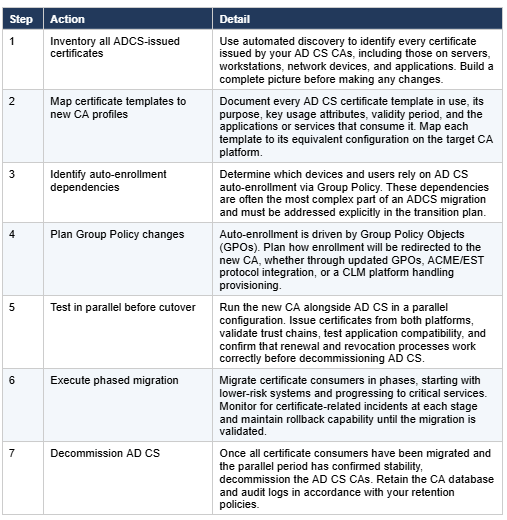
For a real-world example of how this process works at scale, see our migration de-risking case study where we validated a migration methodology for 20 Root CAs through a formal feasibility study before committing to production execution.
Frequently Asked Questions About ADCS Replacement
"What is Active Directory Certificate Services (AD CS)?
Why are organisations replacing ADCS?
Can I keep AD CS and just add a CLM platform on top?
What is the best ADCS replacement platform?
How long does an ADCS migration take?
Will replacing ADCS break auto-enrollment?
Does AD CS support post-quantum cryptography?
What happens to my existing certificates when I migrate away from ADCS?
How do I know which certificates AD CS has issued?
Is ADCS replacement covered by existing Microsoft licensing?
Conclusions: Supplement or Replace Active Directory Certificate Services
While your AD CS implementation may have effectively met past requirements, it is essential to assess whether it aligns with current needs. If there is a significant gap between what is delivered and what is required, consider the following options:
Supplementation — Enhance AD CS by integrating it with CLM technology to incorporate features like automation, full visibility, and compliance. This approach makes sense for organisations heavily invested in the Microsoft ecosystem who need to address specific limitations whilst maintaining their existing Certificate Authority infrastructure.
Replacement — Take a more holistic approach and replace AD CS to better meet your current requirements by transitioning to a platform like EJBCA Enterprise that supports a cloud-first strategy. Modern alternatives support provisioning certificates across cloud environments, integrate with DevOps tools, provide automation that reduces risk, and offer the flexibility needed for digital transformation without the limitations inherent in Microsoft ADCS.
Whichever path you choose, the starting point is the same: understanding what certificates you have, where they are, and what depends on them. Unsung’s PKI consultancy team has delivered ADCS migrations across government and enterprise environments, from supplementation with CLM through to full CA replacement at scale. If you are evaluating your options, we would welcome the conversation.